Configuring Default Apps in Android

The Default Apps policy allows MDM administrators to enforce which applications handle specific intents, link types, and file types on managed Android devices. When enabled, end users cannot change these defaults — the configured app will always be used for the assigned action.
This policy requires Device Owner mode and Android 7.0 (Nougat) or higher. Default app assignments persist across reboots and cannot be overridden by the device user.
Prerequisites
- Devices must be enrolled in Device Owner mode.
- Android 7.0 (API 24) or higher.
- The target app must already be installed on the device before the policy is applied. If the app is not installed, that particular default will be skipped.
- Use the exact package name of the target app (e.g.,
com.google.android.dialer).
How to Configure
- Log in to the Codeproof MDM console.
- Navigate to the policy profile assigned to your target devices or device group.
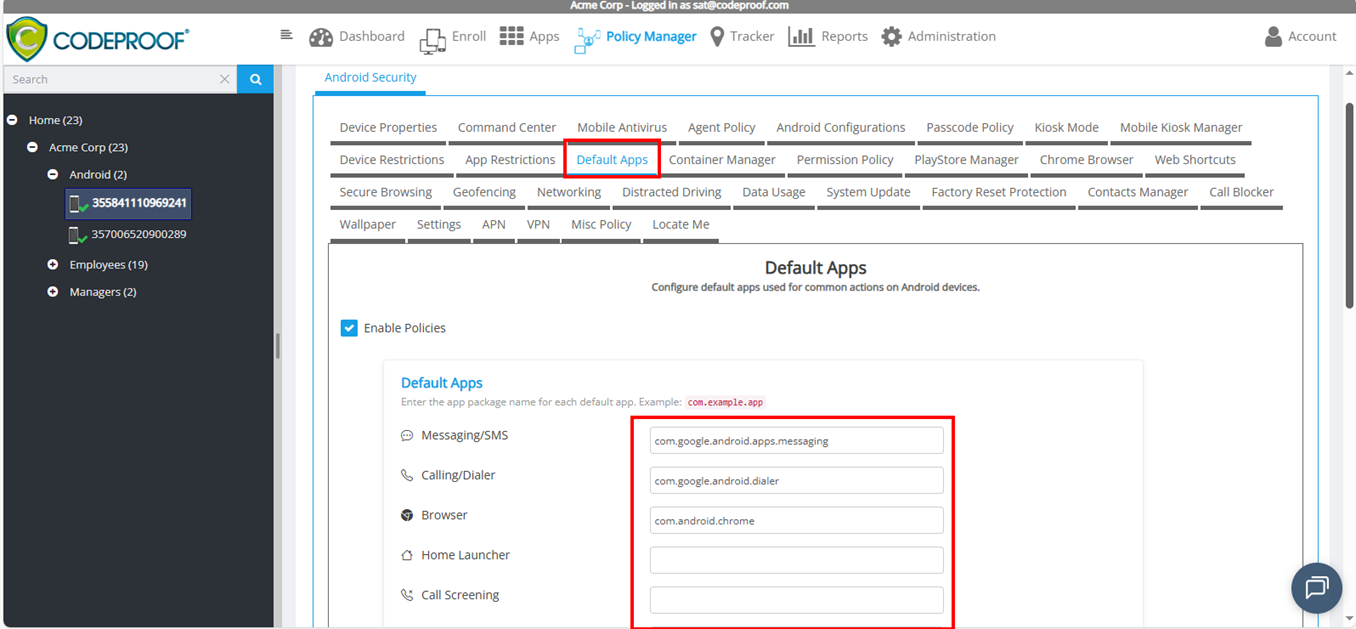
- Open the Default Apps policy section.
- Toggle Enable to turn on the policy.
- Enter the package name for each default app category you want to enforce.
- Save and publish the policy.
The policy will be applied the next time the device checks in, or you can push a sync from the console.
Supported Categories
Default Apps
These control which app the device uses as the system default for core functions.
Setting | Description | Example Package |
Messaging/SMS | Default app for sending and receiving SMS/MMS messages. |
|
Calling/Dialer | Default phone/dialer app for making calls. |
|
Browser | Default web browser for handling HTTP links. |
|
Home Launcher | The home screen launcher. Useful for kiosk or locked-down deployments. |
|
Camera | Default camera app for photo and video capture. |
|
Email Client | Default app for composing emails (mailto: intent). |
|
Contacts | Default contacts/people app. |
|
Calendar | Default calendar app for creating events. |
|
Gallery/Photos | Default app for browsing photos and images. |
|
File Manager | Default file browser/manager app. |
|
Call Screening | Default call screening service (spam filtering, call blocking). |
|
Notes App | Default app for creating notes. |
|
Assistant App | Default digital assistant app. |
|
Link Handling
These control which app opens when the user taps a specific type of link.
Setting | Description | Example Package |
Open Web Links With | Handles |
|
Open Email Links With | Handles |
|
Open Phone Links With | Handles |
|
Open SMS Links With | Handles |
|
Open Map Links With | Handles |
|
Open App Store Links With | Handles |
|
File Handling
These control which app opens when the user taps a specific file type.
Setting | Description | Example Package |
Open PDF Files With | Opens |
|
Open Image Files With | Opens image files (JPEG, PNG, GIF, etc.). |
|
Open Video Files With | Opens video files (MP4, AVI, MKV, etc.). |
|
Open Audio Files With | Opens audio files (MP3, WAV, FLAC, etc.). |
|
Open Text Files With | Opens plain text files ( |
|
Open Archive Files With | Opens compressed archives (ZIP, RAR, 7z). |
|
Open Office Documents With | Opens Word, Excel, and PowerPoint files. |
|
Finding an App's Package Name
If you are unsure of an app's package name, use any of these methods:
- Google Play Store URL: Open the app's Play Store page in a browser. The URL will contain
id=com.example.app— that is the package name. - Codeproof Console: Navigate to the device's installed apps list in the Codeproof console. The package name is shown for each app.
- On the device: Go to Settings > Apps, tap the app, and look for the package name in the app info screen.
Behavior and Notes
- Only filled-in fields are enforced. If you leave a field blank, no default is set for that category and the user retains their existing choice.
- App must be installed. If the target app is not installed on the device at the time of enforcement, that entry is skipped. Once the app is installed and the policy syncs again, the default will be applied.
- User cannot override. Once enforced, the device user cannot change the default app through device Settings.
- Policy re-application. The policy is re-applied on every sync. If you change the target package in the console, the new default will take effect on the next device check-in.
- Uninstalling the target app. If the enforced default app is uninstalled, the device will fall back to the Android system chooser for that intent until the policy is updated or the app is reinstalled.
- Android version limitations. Devices running Android 6.0 (Marshmallow) or lower will ignore this policy entirely.
Common Use Cases
Corporate Kiosk Deployment
Lock down the home launcher and browser to prevent users from leaving the approved environment:
Setting | Package |
Home Launcher |
|
Browser |
|
Open Web Links With |
|
Secure Messaging Deployment
Ensure all SMS and email goes through approved enterprise apps:
Setting | Package |
Messaging/SMS |
|
Email Client |
|
Open Email Links With |
|
Open SMS Links With |
|
Standardized Office Suite
Force all documents, PDFs, and files to open in the same productivity suite:
Setting | Package |
Open PDF Files With |
|
Open Office Documents With |
|
Open Text Files With |
|
Troubleshooting
Issue | Resolution |
Default app not changing on device | Verify the target app is installed. Check that the device is enrolled as Device Owner. Force a policy sync from the console. |
Policy shows enabled but nothing happens | Confirm the device is running Android 7.0+. Devices on Android 6.0 or lower do not support this feature. |
Wrong app opens for a link type | Check that both the "Default Apps" entry and the corresponding "Link Handling" entry are configured. For example, setting the browser default does not automatically handle all |
User reports they changed the default back | This should not be possible in Device Owner mode. Verify the device is truly in Device Owner mode and not just using Device Admin. |
App was uninstalled and now no app opens | Reinstall the target app or update the policy to point to a different installed app. |
Frequently Asked Questions
Q: Can I set different defaults for different device groups? Yes. Create separate policy profiles for each group and configure the Default Apps section differently in each profile.
Q: Does this work on Samsung Knox devices? Yes. This policy uses standard Android Device Owner APIs and works on all OEMs including Samsung, with no Knox-specific configuration required.
Q: What happens if I set both "Browser" and "Open Web Links With" to different apps? The "Browser" setting controls the system default browser role. The "Open Web Links With" setting controls which app handles tapped HTTP/HTTPS links. For consistent behavior, it is recommended to set both to the same app.
Q: Can I enforce defaults for app types not listed here? The current policy supports the categories listed above. If you need additional default app types, please contact Codeproof support.